Data center cabling installation

Data Center Cabling Installation for High-Density Network Infrastructure

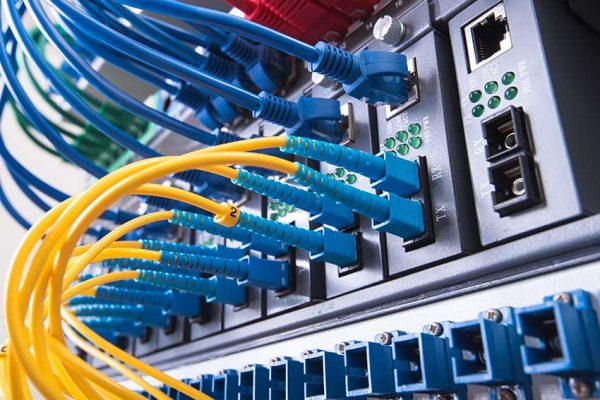
Data centers require structured cabling systems designed to support high device density, large volumes of network traffic and constant operational uptime. Unlike standard office networks, data center environments rely on carefully planned cable routing, fiber backbone architecture and high-performance connectivity between servers, switches and storage systems.

Cablify installs commercial data center cabling infrastructure for enterprise environments, technology facilities and high-performance network environments across the United States. These installations support scalable network growth while maintaining organized cable management and predictable infrastructure performance.

Enterprise data center cablingFiber backbone infrastructureHigh-density rack connectivityNationwide commercial deployment
Data center cabling and nationwide structured cabling infrastructure
Data center cabling for high-density racks, fiber backbone links and enterprise network infrastructure

Designed for technical rooms, server environments and data-driven facilities that need organized copper and fiber architecture, cleaner routing and scalable data center support after handoff.

Rack-to-rack connectivity

Supports dense interconnects between network, compute and storage systems inside organized technical environments.

Fiber and copper coordination

Combines backbone fiber with structured copper Ethernet for practical server and switch connectivity.

Structured cable routing

Helps maintain airflow, traceability and long-term maintainability in high-density rack environments.

Scalable enterprise design

Supports future server growth, equipment turnover and infrastructure expansion without losing organizational clarity.

What data center cabling includes

What data center cabling includes in a high-performance infrastructure environment.

Data center cabling connects servers, network switches, storage platforms and infrastructure equipment inside high-performance computing environments. Unlike traditional office networks, data center networks must support thousands of connections within a confined space while maintaining clear organization and airflow efficiency.

01

Fiber backbone connections between switches

Fiber links commonly connect core, aggregation and distribution environments while supporting high-capacity data flows across the facility.

  • Core switch uplinks
  • Aggregation connectivity
  • Longer backbone pathways
02

Copper Ethernet between servers and switches

Copper cabling such as Cat6 or Cat6A is often used for short-distance server connections and top-of-rack network architecture.

  • Top-of-rack connectivity
  • Short server runs
  • Structured rack patching
03

Rack-to-rack and patching-field connectivity

Structured connectivity between cabinets, patching fields and distribution frames supports equipment growth and cleaner administration.

  • Rack-to-rack routes
  • Patch fields and handoff points
  • Cross-connect planning
04

High-density cable management systems

Data center environments need cable trays, vertical managers, distribution frames and routing standards that keep the infrastructure scalable and manageable.

  • Structured routing systems
  • Airflow-aware organization
  • High-density management hardware
Cabling types

Types of cabling used in data centers.

Data center environments usually combine fiber and copper cabling, with each cabling type selected based on bandwidth requirements, rack density, link distance and equipment architecture.

Fiber optic cabling

Fiber optic cables are the primary backbone of most data center networks. Multimode fiber such as OM3 and OM4 is commonly used within data center environments, while single mode fiber is used where longer distances or higher bandwidth requirements apply.

Copper Ethernet cabling

Copper Ethernet cables such as Cat6 and Cat6A are used for short-distance connections between servers and switches, often in top-of-rack or structured patching environments.

High-speed interconnect cables

Some technical environments use direct attach cables or specialized high-speed interconnects for ultra-high bandwidth server communication.

Mixed fiber and copper architecture

Most enterprise environments use a combination of fiber backbone links and copper server connections so the infrastructure can balance density, speed and practical patching needs.

Core infrastructure

Core components of data center infrastructure cabling.

Data center cabling environments rely on several interconnected infrastructure elements working together inside the rack and room layout.

When these elements are coordinated, the environment is easier to troubleshoot, easier to expand and easier to maintain under heavy connection density.

Data center rack connectivity and business network cabling components
Architecture and connectivity

Data center architecture and connectivity planning.

Modern data centers often use layered network architectures to manage large volumes of traffic and maintain organized connectivity across the facility.

Core network layer

The core layer connects the data center to external networks, cloud paths and other facilities that rely on higher-capacity network transport.

Aggregation layer

The aggregation layer distributes traffic between core infrastructure and rack-level network switches.

Access layer

The access layer connects servers and devices inside each rack or cabinet environment.

Fiber backbone architecture

Fiber optic backbone links commonly connect these layers so the facility can support large traffic volumes with cleaner long-term scalability.

High-density environments

High-density cabling environments require stricter organization.

Data centers often contain thousands of cables within a relatively small space. High-density infrastructure requires careful planning to maintain reliability, accessibility and airflow efficiency.

HD

Structured cable pathways

Overhead trays, vertical managers and defined routing paths help prevent congestion as rack density increases.

CL

Color-coded fiber systems

Color coding makes tracing and support easier in environments with larger numbers of backbone and patching connections.

LB

Consistent labeling practices

Readable labels reduce troubleshooting time and support faster moves, adds and changes inside technical rooms.

CM

Dedicated cable management hardware

Vertical and horizontal managers help maintain access and airflow as cabinet density grows over time.

Planning

Planning a data center cabling deployment.

Planning a data center cabling installation requires careful evaluation of infrastructure requirements so the final environment supports long-term growth without frequent redesign.

Rack density and layout

The number of racks, cabinet arrangement and growth expectations influence cabling pathways and patching design.

Server connectivity requirements

Connection counts, port density and switch placement determine the copper and fiber architecture inside the room.

Fiber backbone architecture

Backbone planning should account for current traffic needs and future scaling without forcing early rework.

Power and cooling considerations

Cable routing must support airflow and access to powered equipment instead of creating obstructions in dense rack rows.

Future infrastructure expansion

Good planning leaves room for additional cabinets, higher patch density and evolving network architecture over time.

Why organization matters

Why organized data center cabling matters.

Organized cabling supports faster troubleshooting, simplified server deployment, improved airflow and cooling efficiency, clearer documentation of network connections and better scalability for future expansion. Without structured cabling practices, high-density data center environments can become difficult to manage very quickly.

FAQ

Frequently asked questions about data center cabling.

These are some of the practical questions businesses ask when planning data center network infrastructure, fiber backbone architecture and high-density rack connectivity.

What is data center cabling?

Data center cabling refers to the structured network infrastructure that connects servers, switches and storage systems inside data center environments.

What types of cables are used in data centers?

Data centers commonly use fiber optic cabling for backbone connections and copper Ethernet cabling for server connections.

Why is fiber commonly used in data centers?

Fiber optic cables support much higher bandwidth and lower signal interference compared to copper cabling, making them ideal for high-performance environments.

How many cables are typically installed in a data center?

Large data centers may contain thousands of network connections depending on the size of the facility and the number of servers installed.

Start a project

Request a data center cabling quote.

Share the rack count, room layout, backbone needs and network-density expectations so the project can move toward a practical data center infrastructure review.

Next step

Need organized technical-room infrastructure for a high-density environment?

Use the contact page to send the facility type, rack layout, fiber and copper scope and project timeline so the conversation can move toward a cleaner enterprise deployment plan.